One of the biggest (but perhaps less flashy) challenges in CALL is access to technology across learning contexts. Increasingly a lot of the technology that can be used for language learning can be accessed via mobile devices, and many traditional computer labs may not the ideal tools for supporting 2.0 learning tools (see the last post). There is certainly a disconnect where desktops/laptops are really useful for some language learning activities (writing, document design, interactive tutorial software), but mobile devices are increasingly as useful (or even more so) for many others, such as listening (podcasts, skype, etc.), reading (anywhere anytime for extensive reading), speaking, recording video, etc. The problem with this, of course, is that computer labs (where they exist) were often visualized as a technological equalizer for learning - students, no matter their access to technology at home, would all have an equal playing field when using a computer lab. Of course not every student has a mobile phone, tablet, or laptop, but the field of CALL seems to be moving to teaching tools dependent on learners having access to mobile devices.
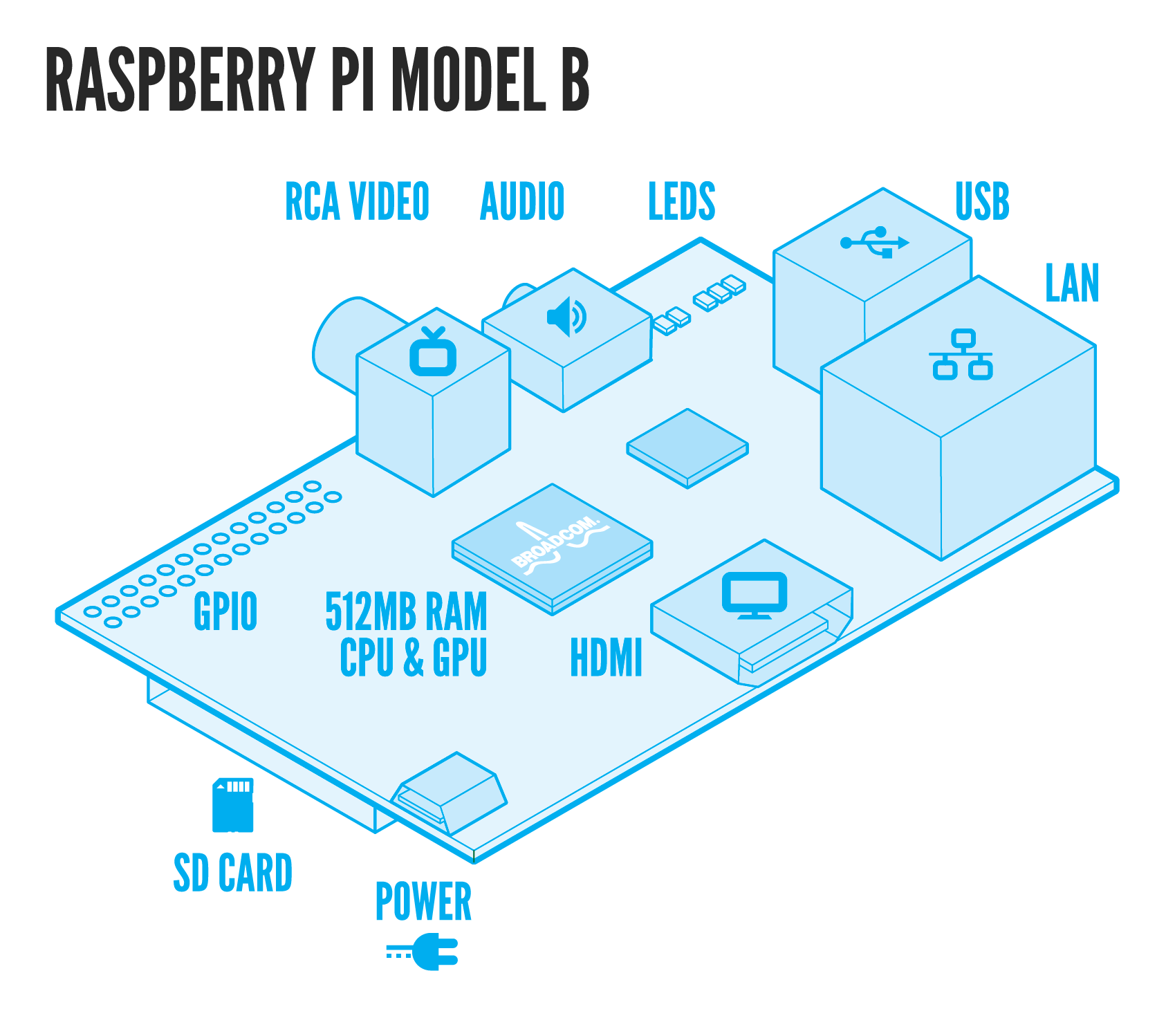
As a result, I am very interested in the idea of using cheap mobile (or semi-mobile) gadgets as educational tools. The Raspberry Pi is probably the current, best example: a $25-35 dollar board computer that can be connected to any monitor/TV and keyboard and mouse. The original goals of the project were to produce a cheap computer that could be used to teach, with a special focus on teaching technology skills (e.g., programming). Of course there are an army of enthusiasts who have imagined all sorts of projects for the Pi, but I still haven't seen any language learning applications. Perhaps there could be some technology-based CBI designed around using the Pi. Alternatively, a potential application could be in simple having modular, cheap computers that students could own (and possibly just plug into docking stations)...perhaps a versatile, contemporary model of getting educational tools into a variety of situations, similar to the One Laptop Per Child project.
Wednesday, March 27, 2013
Monday, March 25, 2013
Listening & Speaking in a Computer Lab
This week we are working on Listening and Speaking in our CALL class. We are looking at a lot of technology tools and several people are giving presentations, including a guest presentation from our local Podcasting expert.
In class today, we'll be working on developing a list of podcasts that may be of use for language teaching/learning. You can view the list here as it develops.
Unfortunately, by trying to cover so much information, we won't have that much time for hands-on work with the tools, which means that our group learning experiences will be somewhat limited to "See this cool tool I've linked in the PPT? It has tons of great teaching applications, but figure them out on your own...outside of class."
But that brings up another point that's very interesting (and salient to this week's topic). We have class once a week in a computer lab. The computer lab model was once one of the biggest resources for technological approaches to education, but in many ways a computer lab seems to have (possibly) outlived its usefulness. Or, rather, it is in need of updating to interact with Web 2.0 tools.
This is not to complain, as I am glad to have access to such a resource. And, actually most of the limitations that we have faced in my class have relatively easy solutions. Rather, I'm interested in some of the limitations to the traditional set-up of a higher education computer lab and why they matter in CALL. Here are two that have been somewhat inconvenient for our class so far:
In class today, we'll be working on developing a list of podcasts that may be of use for language teaching/learning. You can view the list here as it develops.
Unfortunately, by trying to cover so much information, we won't have that much time for hands-on work with the tools, which means that our group learning experiences will be somewhat limited to "See this cool tool I've linked in the PPT? It has tons of great teaching applications, but figure them out on your own...outside of class."
But that brings up another point that's very interesting (and salient to this week's topic). We have class once a week in a computer lab. The computer lab model was once one of the biggest resources for technological approaches to education, but in many ways a computer lab seems to have (possibly) outlived its usefulness. Or, rather, it is in need of updating to interact with Web 2.0 tools.
This is not to complain, as I am glad to have access to such a resource. And, actually most of the limitations that we have faced in my class have relatively easy solutions. Rather, I'm interested in some of the limitations to the traditional set-up of a higher education computer lab and why they matter in CALL. Here are two that have been somewhat inconvenient for our class so far:
- No permission to install software. In order to avoid littering computers with all kinds of programs, computer labs on our campus (and, in my experience, this is true for many large educational institutions) are locked down to allow only administrators the ability to install programs. We could contact the IT person to have the programs pre-installed, but this is not an ideal solution.
- Limited A/V capability. The lab computers (desktops) do not have webcams, which is perfectly normal for computer labs. Nor do they have microphones/headsets. All this makes sense as these labs are paid for by and designed for the composition program on campus (where recording audio/video is not common). However, this limitation of these massive desktops is in stark contrast to the cellphones, laptops, and tablets that most students in higher education carry around with them. Only having a keyboard and mouse on the desktop makes some areas of CALL become very passive or non-interactive experiences.
Tuesday, March 12, 2013
Reading Habits of Teachers
This week we discussed reading and vocabulary acquisition. Before beginning class, we did a quick internal survey of how we read. The survey is fairly sloppy and should be viewed with a suspicious, cocked eyebrow.
However, if you are a teacher and would like to take the survey (it's a quick 5 question survey), you can see it here. I'll add it to the pool of responses.
Reading Habits of Teachers.
The results were probably not that surprising, but I thought it would be good to take a look at some of them. As you can see in the first figure, most of the respondents read the news primarily through news websites. This was a "check all that apply" question, and for many respondents new sites weren't the only source of information; social networking was also a source of reading news.
This, of course, corresponds with the responses to the next question about the way we read (in general). Most of the respondents reported that they read on computers, followed by smart phones. Of course, this question did not make it clear whether reading referred to only news or to reading in general (as it immediately followed the news question, it may have been ambiguous). I have adjusted the question to make it clearer.

Finally, I asked participants what types of reading materials they use with their students and the results highlight the contrasts between how we, as professionals and advanced students read and the types of materials we disseminate to our students. Here are the results. As you can see, there is a big difference here between this figure and the first figure. Part of this is, of course, because textbooks are still such a part of the instructional model, but even comparing things like magazines vs. magazine websites reveals some differences.
However, if you are a teacher and would like to take the survey (it's a quick 5 question survey), you can see it here. I'll add it to the pool of responses.
Reading Habits of Teachers.
The results were probably not that surprising, but I thought it would be good to take a look at some of them. As you can see in the first figure, most of the respondents read the news primarily through news websites. This was a "check all that apply" question, and for many respondents new sites weren't the only source of information; social networking was also a source of reading news.
This, of course, corresponds with the responses to the next question about the way we read (in general). Most of the respondents reported that they read on computers, followed by smart phones. Of course, this question did not make it clear whether reading referred to only news or to reading in general (as it immediately followed the news question, it may have been ambiguous). I have adjusted the question to make it clearer.
Finally, I asked participants what types of reading materials they use with their students and the results highlight the contrasts between how we, as professionals and advanced students read and the types of materials we disseminate to our students. Here are the results. As you can see, there is a big difference here between this figure and the first figure. Part of this is, of course, because textbooks are still such a part of the instructional model, but even comparing things like magazines vs. magazine websites reveals some differences.
Saturday, March 2, 2013
A Teacher's Blog
Recently, someone in my CALL class brought up the question of modeling behaviors and language production, especially in terms of blogging (and using blogging as a reflective practice in teacher development - if I understood the comment correctly). I am guilty of not being an active blogger (obviously not here, but even elsewhere). So, I thought a good way to look at this idea would be to look at reflective writing by other language teachers I admire. I thought I'd start with the blog of a longtime friend of mine, Kevin Giddens (we've known each other since elementary schools, though we only recently realized we were both in the same field).
Kevin is an ESL teacher and teacher trainer and is a proponent of what he calls Do-Nothing Teaching. His blog provides a lot of reflection and insight into his own teaching and serves as a forum for interaction between Kevin and his followers. Specifically, I recommend reading about his DNT challenge and seeing the work that has been produced as part of this challenge in a community of language teachers:
Do-Nothing Teaching
Kevin is an ESL teacher and teacher trainer and is a proponent of what he calls Do-Nothing Teaching. His blog provides a lot of reflection and insight into his own teaching and serves as a forum for interaction between Kevin and his followers. Specifically, I recommend reading about his DNT challenge and seeing the work that has been produced as part of this challenge in a community of language teachers:
Do-Nothing Teaching
General Information
This blog covers my thoughts and ideas about Computer-assisted Language Learning and to provide information for the students in Computer Applications in Linguistics in the MA TESL program at NAU.
Here's a link to my personal website:
Here's a link to the CALL class website (including the course wiki and links to member blogs):
Subscribe to:
Posts (Atom)